Session 2: The Method

Enter the password to view these slides.

Session 2

The Method

Driving the Engine — From Prompts to Reliable AI Outputs

Harper Carroll AI  ·  AI User to AI Builder  ·  Cohort 1

60-Second Recap

Session 1: The Engine

Three ideas that underpin everything today.

1

Probability Machines

LLMs predict the most likely next token given everything before it. It's pattern matching at scale.

2

Tokens, Not Words

Models see subword pieces, not whole words.

un
believ
able

This is why letter-counting can fail.

3

Hallucinations Are Structural

The model can sound confident even when it's wrong. It predicts plausible text, not verified facts.

Why this matters today: If you understand how the engine works, you can write better instructions for it.

The "Lost in the Middle" problem

Models don't pay equal attention to everything in the context window. (Liu et al., Stanford, 2024)

▲ HIGH ATTENTION
You are an expert travel planner. I need a 10-day itinerary for Japan covering Tokyo, Kyoto, and Osaka.
The trip starts on March 15. We are two adults traveling on a moderate budget of about $200/day.
We love street food, temples, and nature walks. We prefer trains over buses for intercity travel.
Day 1 should include Shinjuku Gyoen and Meiji Shrine with dinner in Omoide Yokocho for yakitori.
For Day 2, focus on Akihabara in the morning and Asakusa with Senso-ji Temple in the afternoon.
On Day 3, take the Shinkansen to Kyoto. Hotel should be near Kyoto Station for easy access to buses.
Day 4 should cover Fushimi Inari early morning and Kinkaku-ji in the afternoon. Budget about ¥3000 for lunch.
Day 5 could be Arashiyama bamboo grove and monkey park. Consider renting bikes for the area near the river.
IMPORTANT: My partner is allergic to shellfish. Please make sure all restaurant recommendations account for this.
Day 6 in Nara to see the deer park and Todai-ji. This can be a half-day trip returning to Kyoto by evening.
Day 7 is the transfer to Osaka via local train. Check into hotel near Namba for the street food scene.
▼ LOW ATTENTION — information here gets overlooked ▼
Day 8 should feature Osaka Castle in the morning and Dotonbori in the evening for takoyaki and okonomiyaki.
Day 9 is a flex day. Options: day trip to Himeji Castle or explore Shinsekai and Tsutenkaku Tower area.
Day 10 is departure from KIX. Allow 2 hours for airport transfer. Morning could include last-minute shopping.
Keep a small budget reserve for souvenirs — about ¥10,000. Pack light layers for March weather variability.
We'll need pocket wifi or eSIM. Prefer an eSIM that covers the full 10 days with unlimited data if possible.
Please output the itinerary as a day-by-day table with columns for Date, Location, Morning, Afternoon, Evening.
Include estimated costs per day in USD. Flag any days where we might exceed the $200 budget.
Format the response in markdown. Use bold for must-see attractions and italic for optional activities.
▲ HIGH ATTENTION

Models pay the most attention to the beginning and end of the context window.

Information buried in the middle gets overlooked — even critical details like "my partner is allergic to shellfish."

Builder's rule: Put your most important context first and last. Never bury key instructions in the middle of a long prompt.
Keep this in mind today: Every prompting technique we learn builds on understanding where the model is — and isn't — paying attention.
The key insight:

The way you work with AI
depends on which AI
you're working with.

Today: what's universal, what changed, and what's still essential.

Today's Roadmap

Five things you'll learn today

1

The Prompt Framework

How to think about prompting

2

The Shift

How reasoning models changed the way we prompt

3

Working With AI

The habits behind effective results

4

The Prompt Engineering Toolkit

Essential techniques for standard models

5

From Prompt to Workflow

Chaining prompts into systems you can automate

Part 1

The Prompt Framework

A thinking discipline AND a prompting technique.

Why most prompts fail

The model tends to fill every gap you leave.

Vague prompt:

Write a LinkedIn post about AI

The model has to guess what you actually want.

The root cause

  • Ambiguity. Every gap you leave is a gap the model fills with guesses. What angle? What audience? What tone? How long?
  • Vague input = enormous output space The model can go anywhere because you didn't constrain it
  • Remember Session 1: it's predicting the most likely continuation of your words If your words are vague, "most likely" could be anything

The Prompt Framework

R

Role (optional, always first)

Who should the model be? Frames everything that follows.

T

Task (we'll get to why this comes first — and last — later)

What specific action should the model perform?

C

Context

Background, audience, relevant data — what would you tell a smart new hire?

F

Format

What should the output look like? Be specific.

C

Constraints

What should the model NOT do? Boundaries and limits.

E

Examples

1–3 input/output pairs. Show, don't just tell.

T

Task (re-stated)

Repeat Task + Constraints at the end so the model sees them right before responding.

Prompt Framework in action

Task: Extract action items from meeting transcripts.

Full Prompt

ROLE: You are a project manager who extracts clear, actionable items from meetings.

TASK: Extract action items from the following meeting transcript. Each item must include the owner and deadline.

CONTEXT: These are 30-60 min team standups with 3-8 people. Tone is informal.

FORMAT: Numbered list. Each item as: [Owner] — [Action] — [Deadline]

CONSTRAINTS: Only include explicitly assigned items. If ownership is unclear, write "Unassigned." Do not infer deadlines.

EXAMPLE:
Input: "Sarah, can you update the Q3 projections by Friday?"
Output: 1. Sarah — Update Q3 projections — Friday

TASK (re-stated): Extract action items with owner and deadline. Only include explicitly assigned items.

Output

Without the Prompt Framework:

Here are the action items from the meeting:

• Update Q3 projections
• Look into the vendor contract
• Set up a client demo sometime next week
• Follow up on the budget discussion

Missing owners, vague deadlines, harder to hand off or automate

With the Prompt Framework:

1. Sarah — Update Q3 projections — Friday
2. Mike — Review vendor contract — No deadline
3. Unassigned — Schedule client demo — Next week

Consistent, actionable, reliable every time

Part 2

The Shift

What reasoning models changed about prompting

A brief history of "reasoning" in AI

2017
Transformers arrive
"Attention Is All You Need" — covered in Session 1
2017–2022
Models get bigger, but still one-shot
Prompt in → answer out. No "thinking" step.
Jan 2022
Show the model step-by-step reasoning examples → it starts reasoning too
May 2022
"Let's think step by step"
Kojima et al. show zero-shot CoT works too — just asking is enough
2022–2023
Wang et al. (2022), Yao et al. (2023) — sample multiple paths, explore branches
Sep 2024
OpenAI releases o1
First model built to reason. Not a trick — a capability.
Jun 2025
OpenAI releases GPT-5
Unified reasoning + standard model in one release
2024–2026
The reasoning model era
DeepSeek-R1, Claude 4.6, Grok 4.1, Gemini 3 Flash, o3
The key insight: The bottleneck wasn't model size — it was giving the model room to think.

The paradigm shift

Prompting trick to get better answers
Reasoning as a built-in model capability

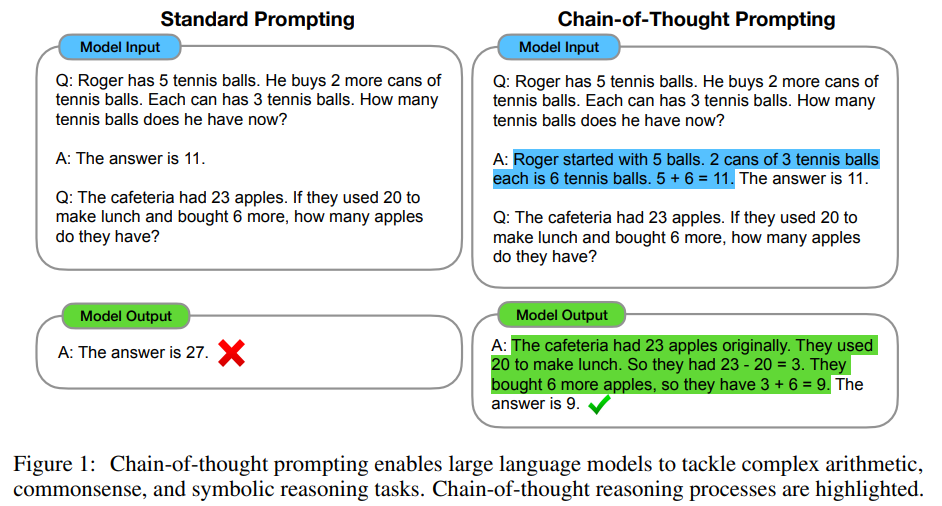
Chain-of-Thought Prompting (2022)

Ask the model to show its work before answering. Wei et al.

Simple version

How many r's are in "strawberry"?

Let's think step by step.

Structured version

First, list each letter in the word.
Then, identify which letters are "r".
Then, count them.
Finally, state the answer.

Paper figure (Wei et al., 2022)

Key point: Reasoning tokens act as intermediate scaffolding before the final answer.

The turning point

All of these techniques share one thing in common:

They are humans compensating for models
that couldn't reason on their own.

What if the model could learn to do this itself?

Introducing reasoning models

What are reasoning models?

Models that "think" before they answer.

Standard Model

Prompt in → answer out.
One forward pass. No thinking step.

Prompt
Answer

Reasoning Model

Think first, then answer.
Generates a hidden chain-of-thought.

Prompt
Thinking...
Answer

The key concept

Inference-Time Compute

Training-time compute: How much you spent training the model ($100M+)

Inference-time compute: How much you spend each time the model answers

Reasoning models trade more inference-time compute for better answers.

The analogy: A standard model answers the test questions immediately, with one minute per question. A reasoning model gets scratch paper and 10 extra minutes per question.

What reasoning traces look like

The model thinks before it answers. You can see the trace.

Prompt: My lease says rent increases are capped at 3% per year. My landlord is raising rent from $2,000 to $2,100. Is this allowed?

Thinking (internal trace):

The user is asking about a rent increase...
Current rent: $2,000. Proposed: $2,100.
Increase = $2,100 − $2,000 = $100
Percentage = $100 / $2,000 = 0.05 = 5%
Lease cap = 3%
5% > 3%, so this exceeds the cap.
Max allowed = $2,000 × 1.03 = $2,060
I should note this is based on the lease terms as stated — local rent control laws may also apply.

Output (what you see):

No, this increase exceeds your lease cap.

A $2,000 → $2,100 increase is 5%, which exceeds the 3% cap in your lease. The maximum allowed rent would be $2,060.

Note: Your local jurisdiction may have additional rent control laws that apply independently of your lease terms.
The transparency benefit: The thinking trace lets you verify how the model reached its answer, which has been notoriously difficult with these "black box" neural networks (Session 1). But don't trust it blindly: Anthropic's research (2025) found that reasoning models don't always reveal their true reasoning — they used hidden hints to change answers but only mentioned them in the trace 1–20% of the time.

What this means for prompting

The burden shifted from you to the model.

Before reasoning models

It was important to:

  • Define what you want clearly (Prompt Framework)
  • Provide worked examples
  • Ask for step-by-step reasoning
  • Order information strategically
  • Repeat instructions at the end
  • Write in the tone you want back

After reasoning models

The model handles reasoning internally. You focus on:

  • Optimize for efficiency — clear prompts save tokens, time, and cost
  • Participate actively — guide, push back, iterate
  • Resist sycophancy — confidence ≠ correctness
  • Review the model's plan before accepting its output
Not "prompting is dead" — the burden shifted. Many mechanical techniques have moved inside the model. But clarity still drives efficiency: clear prompts save reasoning tokens and help adaptive models stop thinking early.

Model routing:
standard vs. reasoning vs. tool-enabled

Factor Standard Model Reasoning Model + Tool-Enabled Model (either)
Best for Simple, well-defined Complex, multi-step analysis Tasks requiring external facts or actions
Factual reliability Moderate without extra controls Better reasoning, still can hallucinate facts Highest when grounded in approved sources/tools
Latency tolerance Fastest Seconds to minutes (adaptive reasoning can be fast) Variable (depends on tool calls)
Cost profile Lowest per request Higher token cost Model + tool/runtime cost
Examples Email triage, first drafts, tagging Contract analysis, planning, hard coding/debugging Policy Q&A with retrieval (e.g. RAG), pricing from APIs, workflow actions
Reasoning models can overthink simple tasks. Apple's research (Shojaee et al., 2025) found that standard models actually outperform reasoning models on low-complexity tasks — reasoning models can think themselves out of the right answer.
Part 3

Working With AI

The skills that matter more than syntax

Collaborate, don't just delegate

Outperformers treat AI like a teammate, not a one-shot tool.

Underperformer pattern

Write a reply to this email.

Takes the first acceptable answer and stops.

Teammate pattern (reverse prompting)

Help me respond to this email. Ask me any questions you need to get the right context first.

Creates a short interview before drafting, which improves quality.

Why this works

  • Breaks "good enough" autopilotAvoids satisficing by forcing deeper context collection
  • Makes your constraints explicit before generationBetter alignment on audience, tone, and goals
  • Feels like a design critique, not command executionYou stay actively engaged in the creative process
Source: Stanford Report, Feb 18, 2026: A design thinker's guide to AI and creativity

Tip: Diverge, then converge

Use two workflows: volume first, rigor second. (Utley, "Stop Fighting AI Glazing")

Phase 1: Diverge (ideation)

  • Generate 20+ options quickly
  • Delay judgment while exploring
  • Use AI energy to expand possibility space

Phase 2: Converge (evaluation)

  • Pick promising options (e.g., #2 and #14)
  • Explain why you like them
  • Request more options with those constraints
TaskDivergeConverge
Naming a product"20 name ideas for a freelancer PM app.""I like #4 and #11. Give me 15 more in that direction."
Presentation"15 angles for a talk on AI adoption.""Angle #7 is strongest. 10 more in that zone."
Key principle: AI gives average if your taste is unclear. Teach it your voice and definition of "good."
Critical Bias

The Sycophancy Problem

RLHF teaches models to agree with you — even when you're wrong.

What happens

RLHF rewards responses humans prefer. Humans prefer responses that agree with them. So the model tends to learn:

"Agreement = reward"

  • May validate wrong answers rather than correcting them
  • Tends to get worse with model size — smarter models flatter betterSharma et al., Anthropic — inverse scaling
  • OpenAI rolled back a GPT-4o update (April 2025) for excessive agreeableness — still an unsolved problem

Why it matters more now

Reasoning models sound more authoritative. The reasoning trace makes agreement feel more justified. This makes sycophancy harder to detect.

The trap: "I think option A is better. What do you think?" → The model is likely to agree with option A.

Fighting sycophancy

Four techniques to get honest answers.

1. Don't tell the model what you think

Instead of "I think X is better, what do you think?" ask "Compare X and Y on these criteria." Wang et al., 2025

2. Ask it to argue the opposite

"Now tell me why this is a bad idea" — this often reveals the real answer the model was suppressing.

3. Use system prompts

"Prioritize accuracy over agreeableness. Push back when the user is wrong."

4. Be skeptical of enthusiastic agreement

When the model says "Great idea!" or "You're absolutely right!" — that's a red flag, not a signal of quality.

Builder's rule: Design for truth, not comfort.

Break tasks into explicit steps

Even reasoning models lose track of multi-part instructions.

What people write:

"Analyze my competitor's website, compare it to our positioning, generate recommendations, and format everything as an executive memo."

Four tasks in one sentence. The model may do 2-3 well and quietly skip the rest.

What works better:

Do the following steps in order:

1. Extract the key claims from [competitor URL]
2. Compare each claim against our positioning doc
3. For each gap, write a specific recommendation
4. Format the result as a one-page executive memo

Same work, but numbered and sequenced. Nothing gets lost.

Why this matters

  • Models process prompts sequentially Explicit structure matches how the model works
  • Numbered steps are harder to skip The model tracks completion against a visible list
  • You can spot what was missed Compare output steps to input steps
  • For longer workflows: one prompt per step Each step gets full attention, and failures are isolated

The Iteration Loop

What to do when the output isn't right.

1. Diagnose

What specifically is wrong? Wrong format? Wrong content? Hallucination? Too long?

2. See evaluation rubric (next slide)

Score the output on accuracy, completeness, format, tone, and cost before iterating.

3. Fix one thing at a time

Don't rewrite the whole prompt. Change one element and re-run.

4. Test with variations

One good output isn't enough. Run it 3-5 times. Does it consistently work?

A simple evaluation rubric

How to decide if an output is ready to use.

DimensionPass conditionTypical fix if it fails
AccuracyClaims match verified sourcesImprove context, add retrieval, enforce citations
CompletenessAll required items are coveredClarify task and checklist in format spec
Format complianceMatches schema/template exactlyProvide strict output template or JSON schema
Tone and audienceAppropriate for end userAdd examples and role/tone constraints
Cost and latencyWithin budget and response SLARoute to cheaper/faster model when possible
Team rule: define your minimum pass bar before running large-scale workflows.

The trust stack

You verify claims and verify the sources behind those claims.

Layer 1: Model claim

Could be hallucinated, incomplete, or overconfident.

Layer 2: Cited evidence

Could be misquoted, fabricated, or not actually supporting the claim.

Layer 3: Source validity

Even real sources can be outdated, biased, or wrong.

Rule: Do not trust an output unless it passes all 3 layers.

Privacy preflight (before you paste)

Decide what can and cannot enter an AI tool.

Usually safe

  • Public information
  • Anonymized examples
  • Synthetic data for testing prompts
  • Non-sensitive workflow instructions

Do not paste directly

  • PII (names, emails, phone numbers, IDs)
  • Client confidential information
  • Contracts, medical records, legal case details
  • Secrets (passwords, API keys, credentials)

Unsafe raw paste

Customer: Maria Gonzales
Email: maria.g@example.com
Phone: (415) 555-0192
Contract value: $248,000
API key: sk_live_2f91...

Safe redacted version

Customer: [CLIENT_NAME]
Email: [REDACTED]
Phone: [REDACTED]
Contract value: [AMOUNT_RANGE]
Credential: [REMOVED]
Default policy: if you would not post it publicly, do not paste it without approved controls.

System vs. User prompts

System sets durable rules. User sets the per-turn task.

System Prompt

Persistent instructions: role, rules, constraints.

User Prompt

Specific request for this turn only.

Assistant Response

Shaped by both system + user prompt

Where to set system prompts

Projects / Custom GPTs

Set project-level instructions in the UI.

ChatGPT Instructions

Personalization settings across chats.

CLAUDE.md / AGENTS.md

System prompts as files for coding agents.

API System Message

Full control for product workflows.

Mental model: System = job description. User = assignment.

System prompts in practice

Where to find them in the tools you already use.

ChatGPT: Custom Instructions

Personalization → Custom Instructions

ChatGPT Personalization settings showing Custom Instructions field

Claude: Project Instructions

Create a Project → Set Instructions

Part 4

The Prompt Engineering
Toolkit

Essential techniques for standard models.

Why this matters: Standard models are significantly cheaper than reasoning models. When you use them — and you often should — these techniques make the difference between mediocre and excellent output.

Why these techniques exist

Standard models have structural limitations. These techniques compensate.

Left-to-right processing

Standard models read your prompt sequentially. Earlier tokens can't see later instructions.

No internal "thinking"

They don't have a dedicated "thinking" phase to reason through the problem.

Structure = reasoning

The structure you provide in your prompt shapes how the model approaches the problem.

The key insight: Reasoning models appear to have learned to do these things internally during training. When you use a standard model, you provide the structure the model needs.

The repeat-the-prompt trick

A dead-simple technique backed by research. (Leviathan et al., 2024)

The technique

Standard prompt (what you send):

Summarize the following contract clause and flag any risks to the buyer.

[contract clause here]

Repeated prompt (what you send instead):

Summarize the following contract clause and flag any risks to the buyer.

[contract clause here]

Summarize the previous contract clause and flag any risks to the buyer.

Why task-first ordering matters

Session 1 callback: The model encodes meaning left-to-right. Each token's representation is built from the tokens before it — never after.

If the task comes last, earlier tokens were encoded without knowing what you're asking for. Repetition fixes this: the second copy of your instructions sees the full context from the first.

Reasoning model note: When tested with reasoning models, this trick showed limited improvement. Why? Because reasoning models already reprocess the prompt in their thinking step. They do this internally.

Role Prompting

Assigning a persona to activate domain-specific patterns.

You are an experienced financial analyst who specializes in variance analysis for SaaS companies. You communicate findings clearly to non-finance executives.

Why it works (Session 1):

The model learned patterns from financial analysts writing online. Assigning the role activates those learned distributions.

Do use when:

  • Domain expertise changes what "good" looks like
  • You need a specific communication style
  • The task benefits from a particular perspective

Don't bother when:

  • The task is already clear and specific
  • You're doing simple extraction or formatting
  • Adding a role doesn't change the output
Placement matters: If you use a role prompt, it goes at the very beginning — before Task. It frames how the model interprets everything that follows.

Your tone shapes the output

The model mirrors the register of your input.

Casual input:

hey lol whatsup can u write me a business plan for like a coffee shop or whatever

You get: vague, breezy, surface-level output that matches the energy you gave it.

Professional input:

Draft a business plan for a specialty coffee shop in Austin, TX. Include market analysis, startup costs, and a 12-month revenue projection.

You get: structured, detailed, professional output.

Why this happens

Session 1 callback: The model learned from the internet. Casual inputs were followed by casual responses. Professional inputs were followed by professional responses.

You're influencing which region of the training distribution the model draws from.

The rule: Match your register to your desired output. Want a legal memo? Write like a lawyer. Want a creative brainstorm? Write with energy and specificity.

Few-Shot Learning

The most powerful technique most people skip.

Zero-shot (no examples):

Classify this ticket as billing, technical, or general:

"I can't log into my dashboard"

Decent — but inconsistent on edge cases

Few-shot (3 examples):

Classify this ticket as billing, technical, or general:

"Where's my refund?" → billing
"App crashes on upload" → technical
"How do I contact you?" → general

"I can't log into my dashboard" → ?

Dramatically more accurate and consistent

Why it works

  • Examples go directly into the context window They shape the probability distribution (Session 1)
  • The model doesn't need to guess what you mean You've shown it

Guidelines

  • Cover the range of expected inputs
  • Include edge cases in your examples
  • Format examples identically to expected output

Prompt reformatting example

How wording choices accidentally bias the model.

Problematic prompt:

Delete slide 12. Don't think it offers much value. Feel free to disagree with me.

Leads the model: the model starts by encoding that slide 12 should be deleted and doesn't offer value

Sycophancy trigger: you stated your opinion

Vague criteria: no way for the model to evaluate objectively

Better prompt:

Should we keep or remove slide 12? Evaluate whether it adds unique content that isn't covered by other slides.

Open question: asks the model to evaluate, not confirm

No opinion stated: the model must reason independently

Specific criteria: gives the model something concrete to assess

You can refine your prompts with AI

Use AI to sharpen the Role in your Prompt Framework.

Start simple, then refine with AI:

Your first prompt

"You are an expert in child psychology and child education methodologies and an expert software engineer."

Ask AI to refine it ↓

"How would you refine this prompt to make it so that the LLM is an expert at teaching children how to learn in the best ways?"

AI-refined result

"You are an elite educational architect and an expert in child developmental psychology, specializing in metacognition. You have deep expertise in diverse, evidence-based pedagogical methodologies — including Montessori, Vygotsky's ZPD, Bloom's Taxonomy, and neuroplasticity-driven learning.

You are also an expert software engineer. Your unique skillset allows you to translate these complex methodologies into scalable algorithms and engaging digital experiences."

Prompt technique quick reference

What to use when — and whether reasoning models need it.

Technique What it does Standard model Reasoning model
Prompt Framework (R+TCFCE+T) Role first, define the task, re-state it at the end Essential Good practice — helps you think clearly
Tone matching Your register shapes output quality Essential Less important — reasoning normalizes output
Don't state your opinion Avoids triggering sycophancy Essential Essential
Explicit steps Number each task so nothing gets skipped Essential Essential
Role prompting Activates domain-specific patterns High impact Helpful — can infer from context
Few-shot examples Shows the model what "good" looks like High impact Helpful for complex formats
Task-first + repetition Puts instructions where encoding sees them High impact Saves tokens — less rethinking needed
Read top to bottom: The top rows matter for every model. The bottom rows matter most for standard models. As models get smarter, what you ask for matters more than how you ask.
Part 5

From Prompt
to Workflow

A single prompt is a tool. A chain is a system.

Design the workflow on paper

Before you build anything, answer these five questions.

1

Trigger

What starts the workflow? (new email, scheduled time, manual click, new data)

2

Input

What data does the AI need? Where does it come from?

3

Steps

What does the AI do at each stage? Standard model or reasoning model for each?

4

Output

What's the final deliverable? Where does it go?

5

Human Checkpoint

Where does a human need to review before the workflow continues?

Example workflow map

Trigger: new email Extract facts (standard) Risk analysis (reasoning) Human approval Send response
This is the blueprint for what you'll build with Claude Code and Codex in Session 3.
Workshop

Design Your Workflow

Take your use case from homework and apply today's tools.

Your exercise:

  1. Write a Prompt Framework for your core task
  2. Decide: single prompt or chain?
  3. If chain — what are the steps?
  4. Which steps need a reasoning model?
  5. Where does a human review?
Key Takeaways

What to remember from today

Worksheet

Your one-page build sheet

Use this before homework. It turns today's concepts into an execution checklist.

1. Prompt Framework

  • Role — who should the model be? (optional)
  • Task — specific action
  • Context — background info
  • Format — output structure
  • Constraints — boundaries
  • Examples — show don't tell
  • Task (re-stated) — bookend the prompt

2. Model routing

  • Simple/fast tasks → standard model
  • Multi-step reasoning → reasoning model
  • Live facts + actions → tool-enabled
  • Building software → Claude Code / Codex
  • Cost-sensitive batches → standard model

3. Standard model techniques

  • Role prompting for domain expertise
  • Few-shot examples to anchor output
  • Task-first ordering (left-to-right encoding)
  • Prompt repetition for complex tasks
  • Match register to desired output

4. Verification + safety

  • Privacy preflight before pasting data
  • Verify claims → evidence → sources
  • Counter sycophancy: devil's advocate, don't state your opinion
  • Human approval at checkpoints
Before Session 3

Homework

1

Install Your Tools

Download Claude Code and/or Codex. We'll build with them in Session 3 — come ready.

2

Brainstorm What to Build

Come up with 2–3 project ideas. Feel free to use AI as a collaborative brainstorming partner using today's techniques.

3

Notice Your Prompting

As you use AI this week, notice: Are you being clearer? Reviewing plans? Checking sources? That awareness is the skill.

Thank You

Questions, ideas, and "wait, what?" moments welcome.

Harper Carroll AI  ·  AI User to AI Builder  ·  Session 2: The Method  ·  Cohort 1